News Ticker

Menu

Browsing "Older Posts"

Browsing Category "technology"

How Virtual Reality Works

Monday, January 4, 2016 / No Comments
webstealer virtual reality images

What do you think of when you hear the words virtual reality(VR)? Do you imagine someone wearing a clunky helmet attached to a computer with a thick cable? Do visions of crudely rendered pterodactyls haunt you? Do you think of Neo and Morpheus traipsing about the Matrix? Or do you wince at the term, wishing it would just go away?

Virtual Reality Interactivity

/ No Comments
Virtual Reality Interactivity
Disney Quest’s Cyber Space
Mountain Capsule
Immersion within a virtual environment is one thing, but for a user to feel truly involved there must also be an element of interaction. Early applications using the technology common in VE systems today allowed the user to have a relatively passive experience. Users could watch a pre-recorded film while wearing a head-mounted display(HMD). They would sit in a motion chair and watch the film as the system subjected them to various stimuli, such as blowing air on them to simulate wind. While users felt a sense of immersion, interactivity was limited to shifting their point of view by looking around. Their path was pre-determined and unalterable.
Today, you can find virtual roller coasters that use the same sort of technology. Disney Quest in Orlando, Florida features Cyber Space Mountain, where patrons can design their own roller coaster, then enter a simulator to ride their virtual creation. The system is very immersive, but apart from the initial design phase there isn't any interaction, so it's not an example of a true virtual environment.
Interactivity depends on many factors. Steuer suggests that three of these factors are speed, range and mapping. Steuer defines speed as the rate that a user's actions are incorporated into the computer model and reflected in a way the user can perceive. Range refers to how many possible outcomes could result from any particular user action. Mapping is the system's ability to produce natural results in response to a user's actions.
Navigation within a virtual environment is one kind of interactivity. If a user can direct his own movement within the environment, it can be called an interactive experience. Most virtual environments include other forms of interaction, since users can easily become bored after just a few minutes of exploration. Computer Scientist Mary Whitton points out that poorly designed interaction can drastically reduce the sense of immersion, while finding ways to engage users can increase it. When a virtual environment is interesting and engaging, users are more willing to suspend disbelief and become immersed.
True interactivity also includes being able to modify the environment. A good virtual environment will respond to the user's actions in a way that makes sense, even if it only makes sense within the realm of the virtual environment. If a virtual environment changes in outlandish and unpredictable ways, it risks disrupting the user's sense of telepresence.
see also:

Virtual Reality Immersion

/ No Comments
Virtual Reality Immersion
A virtual reality unit that allows the
user
 to move freely in any direction
In a virtual reality environment, a user experiences immersion, or the feeling of being inside and a part of that world. He is also able to interact with his environment in meaningful ways. The combination of a sense of immersion and interactivity is called telepresence. Computer scientist Jonathan Steuer defined it as “the extent to which one feels present in the mediated environment, rather than in the immediate physical environment.” In other words, an effective VR experience causes you to become unaware of your real surroundings and focus on your existence inside the virtual environment.
Jonathan Steuer proposed two main components of immersion: depth of information and breadth of information. Depth of information refers to the amount and quality of data in the signals a user receives when interacting in a virtual environment. For the user, this could refer to a display’s resolution, the complexity of the environment’s graphics, the sophistication of the system’s audio output, etc. Steuer defines breadth of information as the “number of sensory dimensions simultaneously presented.” A virtual environment experience has a wide breadth of information if it stimulates all your senses. Most virtual environment experiences prioritize visual and audio components over other sensory-stimulating factors, but a growing number of scientists and engineers are looking into ways to incorporate a users’ sense of touch. Systems that give a user force feedback and touch interaction are called haptic systems.
For immersion to be effective, a user must be able to explore what appears to be a life-sized virtual environment and be able to change perspectives seamlessly. If the virtual environment consists of a single pedestal in the middle of a room, a user should be able to view the pedestal from any angle and the point of view should shift according to where the user is looking. Dr. Frederick Brooks, a pioneer in VR technology and theory, says that displays must project a frame rate of at least 20 - 30 frames per second in order to create a convincing user experience.
see also:

Virtual Reality Games

/ No Comments
webstealer virtual reality games wii controller
The Wii controller in action
Scientists are also exploring the possibility of developing bio-sensors for VR use. A bio-sensor can detect and interpret nerve and muscle activity. With a properly calibrated bio-sensor, a computer can interpret how a user is moving in physical space and translate that into the corresponding motions in virtual space. Bio-sensors may be attached directly to the skin of a user, or may be incorporated into gloves or bodysuits. One limitation to bio-sensor suits is that they must be custom made for each user or the sensors will not line up properly on the user’s body.
Mary Whitton, of UNC-Chapel Hill, believes that the entertainment industry will drive the development of most VR technology going forward. The video game industry in particular has contributed advancements in graphics and sound capabilities that engineers can incorporate into virtual reality systems’ designs. One advance that Whitton finds particularly interesting is the Nintendo Wii’s wand controller. The controller is not only a commercially available device with some tracking capabilities; it’s also affordable and appeals to people who don’t normally play video games. Since tracking and input devices are two areas that traditionally have fallen behind other VR technologies, this controller could be the first of a new wave of technological advances useful to VR systems.
Some programmers envision the Internet developing into a three-dimensional virtual space, where you navigate through virtual landscapes to access information and entertainment. Web sites could take form as a three-dimensional location, allowing users to explore in a much more literal way than before. Programmers have developed several different computer languages and Web browsers to achieve this vision. Some of these include:
  • Virtual Reality Modeling Language (VRML)- the earliest three-dimensional modeling language for the Web.
  • 3DML - a three-dimensional modeling language where a user can visit a spot (or Web site) through most Internet browsers after installing a plug-in.
  • X3D - the language that replaced VRML as the standard for creating virtual environments in the Internet.
  • Collaborative Design Activity (COLLADA) - a format used to allow file interchanges within three-dimensional programs.
Of course, many VE experts would argue that without an HMD, Internet-based systems are not true virtual environments. They lack critical elements of immersion, particularly tracking and displaying images as life-sized.
see also:

Virtual Reality Applications

/ No Comments
webstealer virtual reality applications
Using virtual therapy to treat a
patient’s fear of flying.
In the early 1990's, the public's exposure to virtual reality rarely went beyond a relatively primitive demonstration of a few blocky figures being chased around a chessboard by a crude pterodactyl. While the entertainment industry is still interested in virtual reality applications in games and theater experiences, the really interesting uses for VR systems are in other fields.
Some architects create virtual models of their building plans so that people can walk through the structure before the foundation is even laid. Clients can move around exteriors and interiors and ask questions, or even suggest alterations to the design. Virtual models can give you a much more accurate idea of how moving through a building will feel than a miniature model.
Car companies have used VR technology to build virtual prototypes of new vehicles, testing them thoroughly before producing a single physical part. Designers can make alterations without having to scrap the entire model, as they often would with physical ones. The development process becomes more efficient and less expensive as a result.
Virtual environments are used in training programs for the military, the space program and even medical students. The military have long been supporters of VR technology and development. Training programs can include everything from vehicle simulations to squad combat. On the whole, VR systems are much safer and, in the long run, less expensive than alternative training methods. Soldiers who have gone through extensive VR training have proven to be as effective as those who trained under traditional conditions.
In medicine, staff can use virtual environments to train in everything from surgical procedures to diagnosing a patient. Surgeons have used virtual reality technology to not only train and educate, but also to perform surgery remotely by using robotic devices. The first robotic surgery was performed in 1998 at a hospital in Paris. The biggest challenge in using VR technology to perform robotic surgery is latency, since any delay in such a delicate procedure can feel unnatural to the surgeon. Such systems also need to provide finely-tuned sensory feedback to the surgeon.
Another medical use of VR technology is psyc­hological therapy. Dr. Barbara Rothbaum of Emory University and Dr. Larry Hodges of the Georgia Institute of Technology pioneered the use of virtual environments in treating people with phobias and other psychological conditions. They use virtual environments as a form of exposure therapy, where a patient is exposed -- under controlled conditions -- to stimuli that cause him distress. The application has two big advantages over real exposure therapy: it is much more convenient and patients are more willing to try the therapy because they know it isn't the real world. Their research led to the founding of the company Virtually Better, which sells VR therapy systems to doctors in 14 countries.
see also:

Look new trend in digital media

/ No Comments

Virtual Reality (VR) : In new year incinerate of virtual reality will be expanded. By the way, VR devices are still available, but it only support Google card board of mobile. So next year if you get to see as much sophisticated handsets of Oculus rift & Sony's PlayStation's VR, then there is no need to be surprised.

see also :

Augmented Reality (AR) : This technique can also be seen in the new year. Google and Microsoft plans to launch it in the new year. The AR Magic Leap and Hololens name will be in the market and more or less it will make you feel same as realistic Live Translation App World.

see also :

Streaming Services : Considering the popularity of streaming services the companies will offer some incredible changes in these services in new year.

see also :

Streaming Services

/ No Comments
streaming services
choose the best streaming services
Streaming or media streaming is a technique for transferring data so that it can be processed as a steady and continuous stream. Streaming technologies are becoming increasingly important with the growth of the Internet because most users do not have fast enough access to download large multimedia files quickly. With streaming, the client browser or plug-in can start displaying the data before the entire file has been transmitted.

For streaming to work, the client side receiving the data must be able to collect the data and send it as a steady stream to the application that is processing the data and converting it to sound or pictures. This means that if the streaming client receives the data more quickly than required, it needs to save the excess data in a buffer. If the data doesn't come quickly enough, however, the presentation of the data will not be smooth.

There are a number of competing streaming technologies emerging. The Best Free Movie Sites to Watch TV Shows and Films. Descriptions:

  1. Vumoo - Mobile friendly. These guys have been providing quality free streaming movies since early last year. A nice modern design combined with an easy to use interface will get you up and running in seconds. All recent hits are available. What I especially like about this top streaming site is the range of links to choose from. In general, HTML5 streaming links are prioritized, which is great for users watching on tablets or iPhones.
  2. SolarMovie - Also here for a good time now, and gaining two positions since last month. A newly designed user interface produces a pleasant overall experience. It could soon be the best streaming sites in this list. You can search for popular titles right from the landing page. Or simply click on the top navigation bar to select the desired category. For those that like to chat away, check out their long-standing forum loaded with many hot discussion topics.
  3. Watch32HD - Mobile friendly. It has only been ranked for several weeks. Many thanks for the positive feedback from Android and iOS users, who voted it the best free streaming site of 2015. The modern HTML5 player used here makes it perfect to watch movies on mobile phones or tablets. This was one of the first free movie websites to offer HTML5 technology.
  4. MovieNight - Mobile friendly. If you can stand the white background glare from your dark room, then here you really have a gem. The designers have gone for full simplicity. Basically it means just click and go. Everything plays within the same window without redirecting to third parties. Playback is high definition and streams from all devices. Also a good option to watch on PlayStation and Xbox.
  5. Primewire - A really easy to use platform which has a massive database of recent and older titles. Its hard not to find what your looking for. The lack of annoying adverts is something that I especially like. The site has gone through a lot over the last five years. Its domain used to be LetmeWatchThis before someone stole it from them. Nevertheless, here they are still up and running as smooth as ever!
  6. Zmovie - Several places were lost this week due people complaining about the overall presentation. Pages could indeed be organised slightly better. Yet there are many that like the lack of pop-ups and huge choice of links per movie. There is a reason why they are in the top 10. New releases are always updated as soon as available.
  7. Movie4k - Once known under a different name. A long surviving site that used to be one of the best here. The enormous database covers all genres and years. Different language options are available too. Both German and English viewers flock here. Many veteran users within the movie streaming community insist that this should be the best website.
  8. WatchSeries - People have begged me to add this TV Show site for a good while now. All episodes are up to date and links work perfectly. The front page informs of recent updates, while suggesting what's on offer. Without a doubt this had to be the best site to watch free TV Shows for those that like simplicity. Navigation is easy and layout is basic.
  9. Tubeplus - Many documentaries, genres, and years to choose from. A powerful charts feature uses IMDb data to allow selections via interactive diagrams. Thank you to the many fans that pointed out this innovative piece of functionality.
  10. Viooz - A pleasant dark theme will leave your eyes feeling fresh. I honestly struggle searching for the best movie website while staring at a glaring white screen from my dark room. Users can stay on the page when watching and playback quality can be increased with a click in the bottom left corner. For foreign films: results can be displayed by country and language.

Augmented Reality

/ No Comments
What is Augmented Reality?

webstealer augmented reality new technology
Visualization of Augmented Reality
Augmented reality (AR) is a live, direct or indirect, view of a physical, real-world environment whose elements are augmented by computer-generated sensory input such as sound, video, graphics or GPS data. It is related to a more general concept called mediated reality, in which a view of reality is modified (possibly even diminished rather than augmented) by a computer. As a result, the technology functions by enhancing one’s current perception of reality. By contrast, virtual reality replaces the real world with a simulated one. Augmentation is conventionally in real-time and in semantic context with environmental elements, such as sports scores on TV during a match. With the help of advanced AR technology (e.g. adding computer vision and object recognition) the information about the surrounding real world of the user becomes interactive and digitally manipulable. Artificial information about the environment and its objects can be overlaid on the real world.

see also:

How Augmented Reality Works

/ 2 Comments
A guide to Augmented Reality
    Augmented Reality gathers a wide variety of user experiences. We distinguish 3 main categories of Augmented Reality tools.
      webstealer augmented reality work 1 new technology
    • Augmented Reality 3D viewers, like Augment, allow to place life-size 3D models in your environment with or without the use of trackers.
    • Augmented Reality browsers enrich your camera feed with contextual information. For example, you can point your smartphone at a building to display its history or estimated value.
    • Augmented Reality games create immersive gaming experiences, like shooting games with zombies walking in your own bedroom!


    Augmented Reality devices

    Augmented Reality can be used on all screens and connected devices :
      webstealer augmented reality work 2 new technology
    • On smartphones and tablets, Augmented Reality feels like a magic window. Hundreds of Augmented Reality apps are available on iPhone, iPad and Android.
    • On PC and connected TV, Augmented Reality works with a webcam, which can be quite cumbersome when you have to manipulate a tracker in front of your screen.
    • On connected glasses and lenses, Augmented Reality feels like being Robocop.


    Video Related to Augmented Reality...


    Virtual Reality

    Tuesday, December 29, 2015 / No Comments
    webstealer virtual reality

    Virtual reality is an artificial environment that is created with software and presented to the user in such a way that the user suspends belief and accepts it as a real environment. On a computer, virtual reality is primarily experienced through two of the five senses: sight and sound.

    How to Back Up Your Android Smartphone

    Tuesday, May 26, 2015 / 1 Comment

    If your phone crashes unexpectedly, or worse gets lost or stolen, then you'll not just be down the cost of a phone, but also a huge amount of data. To get around that, you need to enable cloud backups for as many things as possible, so that logging your account into a new handset transfers most of your data automatically. But not everything can be backed up that way, and that's why it's still important to take regular backups of your phone.
    While some third-party apps like Titanium Backup and Helium will let you take a full backup your Android smartphone, they are not for everyone. Most users don't know about rooting their phones, or want to mess around with installing ADB drivers. No worry, it may take a few more steps, but you'll get there (almost).
    Here's how to back up almost any Android smartphone.
    Backing up to the cloud
    1. On your phone, go to Settings > Accounts & sync.
    2. Under ACCOUNTS, and tick mark "Auto-sync data". Next, tap on Google. Now, tap on the Gmail ID you used to sign onto the phone.
    3. Here, you can turn on all the options so that all your Google related information gets synced to the cloud. This includes your contacts, photos (uploaded to Google+, privately if you want), app data, calendar events, Chrome tabs, your Google Fit data and more.
    4. Now go to Settings > Backup & Reset.
    5. Check Back up my data.
    This will save app data and all of your phone's settings including Wi-Fi passwords to your Google account. When you sign in using this Google account on another phone, all of your preferences, photos (via Google+), and contacts will be imported automatically. This data is synced regularly and you just need to log into another device with the same account to recover it. This does not cover your text messages and various other types of data - you'll have to back them up yourself.
    Locally back up media, messages and apps
    Next, you'll want to save the music, movies and other media you've saved on your phone's memory card. This process is easy - just connect your phone to a PC and copy everything that's in the microSD card. This is a manual process so you'll need to make a routine of doing this.
    Media
    1. Connect your phone to the computer with a USB cable. If you are on a Mac, make sure you have the Android File Transfer application installed before you do this.
    2. Open My Computer on your PC, or Finder on your Mac.
    3. Navigate to the SD card and copy all the files you want to save to your computer.
    4. After the copying is done, you can unplug your phone.
    Text Messages 


    You can easily save all your text messages and call logs to your Gmail account by using an app called SMS Backup+. Try these steps:
    1. Download SMS Backup+.
    2. Open the app and tap Connect.
    3. Pick your Gmail account from the pop-up.
    4. Now grant SMS Backup+ permission to access your Google account.
    5. Now go back to the app and tap Backup. This will save all your text messages to your Gmail account.
    6. Log in to Gmail from any Web browser and on the left side you'll see a new label -SMS. Click it to view all the text messages that have been backed up.
    7. To restore these messages, just tap Restore in SMS Backup+.
    8. Tap OK in the pop-up.
    9. You'll be asked to set SMS Backup+ as your default SMS app. Tap Yes. This is needed to restore messages.
    10. Now the app will automatically restore all your messages and call logs. Once the process is complete, the app will show a pop-up that restores your default SMS app. Tap Yes.
    Apps
    The next step is to back up and restore installed apps. You can re-download apps easily if you're using the same Google account on the new device - just open Google Play, tap the hamburger icon (three horizontal lines) on the top-left > My apps. You can install all previously purchased apps from there.
    On the other hand, a local backup could be faster to restore, and wouldn't waste bandwidth either. And it's also pretty easy to do.
    1. Download ES File Explorer.
    2. Swipe the screen to the right to reveal the Homepage of ES File Explorer.
    3. Tap APP which is under a blue Android robot icon on the top-right.
    4. Tap and hold any app until you see a checkmark on its icon.
    5. Now tap the tick-mark icon on the top-right, the one inside a box with a dotted frame. This will select all apps.
    6. Tap Backup that's on the bottom row. This will save a copy of the apk files of all your apps.
    7. To view which apk files have been saved, tap User apps at the top. From the pop-up, select Backed-up Apps.
    8. Tap any app's apk file here to install that app without Internet.
    9. To save a copy of these files to your computer, connect your Android phone to a PC via USB.
    10. The phone will appear in My Computer like a pendrive. Open it.
    11. Go to Internal Storage > backups > apps.
    12. Copy all the apk files here. In case you format your device, or change handsets, you can quickly copy these apk files to it and install the apps again by placing them in the same folder on your phone, and then following steps 7 and 8.
    By following these steps, you're able to save a copy of all your contacts, text messages, media, apps, Wi-Fi passwords, and your app data. Of course, doing everything one by one is a little cumbersome, and the best way to back up your phone is to use a third party backup tool. We've used Titanium Backup and it is excellent but it requires root access on your Android phone, which is something typically expected from more advanced users. Even its interface is too clunky for most average people.
    Helium is a great app for those who haven't rooted their phones. It has a nice interface too, but it only works with select Android phones from some international manufacturers. If you bought a phone from Micromax, Karbonn, Lava or countless other brands, you won't be able to use Helium. Further, using Helium requires you to install drivers for the phone on your computer as well.

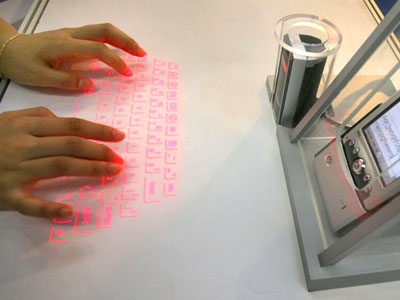
    Now operate smartphone with your bracelet

    Monday, January 12, 2015 / 3 Comments

    cicret_bracelet
    The Cicret Bracelet will project a tablet interface onto the user's arm

    As wearable technology continues to evolve and define the space, as well as redefine mobile in general, we get to enjoy the hatching of new ideas. It really is quite remarkable, as seeing a completely new set of ideas form and become an entirely new, tangible product does not happen that often. With wearables gaining some traction, smartphones and tablets are by no means the only mobile devices around nowadays. Now, though, Cicret is looking to take things a step farther and turn your arm into a smartphone.
    cicret_bracelet
    The Bracelet comprises a pico projector and a row of eight proximity sensors that point towards the user's forearm. It operates as a standalone device and, when activated with a twist of the wrist, projects an Android interface onto the users arm. The proximity sensors detect where the user's finger or fingers are and allow them to interact with the interface as they would any other Android device.
                                          cicret_bracelet
    It should be interesting to see if the Cicret Bracelet can improve on the technology, to make something we'd actually want to use. There is one more interesting feature in this device is that it is water resistant. You can also use it with wet hand. In below image its an example of using this device in bath tub.
    cicret_bracelet
    The device will allow users to browse the web, send and receive emails and play games. It will also be possible for users to pair it with an existing smartphone, answer incoming phone calls and activate the speakerphone functionality on the their smartphone. The Cicret Bracelet features an accelerometer and a vibration module, along with an LED for notifications. Connectivity is provided by way of WiFi, Bluetooth and a Micro USB port. It is expected to be made available in 16 GB and 32 GB models.
    cicret_bracelet_components
    There are many features available in this Cicret Bracelet. In above image all features and its components are indicates with name.
    See features of Cicret Bracelet in Video:
    :

    NOTE: This is not available in market. If you found then that is pirated. For more details visit its official website http://www.cicret.com.


    Now you can start your car from anywhere

    Monday, January 5, 2015 / No Comments
    bLUE_LINK
    Let,s think, you are going to your car and it will start remotely by you. If you parked your car in crowded parking and car will indicates its location. From anywhere you can open and shut the doors and windows of the car.!!! I'm sure you think how it can be possible? But, it all will possible.

    hyundai app

    South Korean car company Hyundai developed a new app. Blue link named this app will do it possible to start your car from away. You can also search your car in crowded parking. Open or close the door. Company introduce this app on 6th January 2015 in "Consumer Electronics Show 2015" which will be held in Las Vegas.
    Hyundai android

    Customers have to link this app to their android app via Bluetooth. Bluetooth Link app can be downloaded from the play store. To develop this app Hyundai tied up with Station Digital media. This app have functions like:
    1. Tun on and off the lights from away.
    2. Blow horn.
    3. Getting help on side of the road.
    4. and these types of all functions will work.

    Also available in Samrtwatch:

    Hyundai Smartwatch App

    Smart-watch-wearing Hyundai owners just gained more remote control over their vehicles thanks to a new Android Wear version of the company's Blue Link app. The app gives drivers the ability to access remote vehicle operations right from their wrists, such as starting and stopping the engine, locking and unlocking the doors, and activating safety features like flashing the headlights or honking the horn.  The app connects any Android Wear watch to the Blue Link smartphone app via Bluetooth, and there's no range limit — the controls can be accessed from anywhere as long as there's a data connection. It also takes advantage of Android Wear's voice control capabilities, allowing for commands like "start my car," or "lock my car." The Blue Link system was originally launched in 2012 and is available in a number of Hyundai's 2015 models like the Sonata, Genesis, and Azera.

    Easily unlock Micromax mobile if it is LOCKED!!!!

    Friday, January 2, 2015 / No Comments
    micromax_boot
    These days most people are using the android mobile. Many companies are now making the Android phones. Micromax is one of the best company of them. Most of people want to secure their data from others. So they used the security system given in android phones. There are many types of locking systems in the android like - pattern lock, pin lock, password lock, face lock, etc. Most of users preferred to use pattern lock. Sometime android users forgot there patterns then they try continuously attempt wrong patterns, or some others can also attempt with wrong pattern to open screen lock. For security reasons it get locked and ask for email and password (attached gmail account). Now I will let you know how to open the screen lock.

    Method 1: Enter your email and password

    micromax_locked
    1. Be sure that Internet connection of your phone is active.

    2. Enter your email username (that is registered to your gmail account).

    3. Enter your gmail password.

    4. Now click on sign in.

    5. It will generate the reset code and send to your gmail account.

    6. Now enjoy your unlocked phone. 

    Method 2: Unlock using hard reset

    micromax_bootscreenWarning!!! In this method your data will be lost.

    1. Switch off, pull battery. Insert battery.

    2. Press and hold volume up + volume down + power buttons together.(There are different ways of combination of these keys in different models but this is common method.)

    3. After doing this you will be boot in recovery mode.

    4. Now use volume keys to up and down in the menu and choose power key to the option.

    5. Choose wipe data.

    6. Choose wipe cache.

    7. Reboot device.

    Method 3: Using Android Debug Bridge

    Loading Image...
    If you want to to unlock your phone without loosing your data then you have to use method.
    1. First we need to setup ADB in your device.
    2. You need these files to set up the ADB or use Google search how to install ADB in windows.
    3. Just make a folder adb in C drive. Like C:\adb\
    4. Copy the files in that folder.
    5. Install drivers for you phone.(Use PDAnet if you don't have drivers of your phone.)
    6. Turn on usb debugging in your phone. Setting>Development>USB Debugging and turned it on.
    7. Now! open Command Prompt (ctrl+r>cmd>enter).
    8. Type cd c:/adb and press Enter.
    9. Write steps from below image.

    cmd_code
    10. If the step 9 not works then enter code: adb shell rm /data/system/gesture.key and press enter.


    This requires root in some devices and some it just works without problem.you can try both of them, here is how I managed to remove the lock:


    1. Run the first method.

    2. Reboot
    3. Run the second method
    4. Reboot


    5 Useful gadgets of the year 2014

    Thursday, January 1, 2015 / No Comments
    !!!!!!!!HAPPY NEW YEAR(2015)!!!!!!!!  

    Top_gadgets
    Make your life interesting with new gadgets in new year. It's a good idea to collect and get detailed information about the gadgets. If you want to get knowledge about these technologies and gadgets then its a best place for you. In this website I post information for the visitors as need of current generation. In this article I include some useful gadgets of 2014.
    Leap Motion
    leap_motion
    For decades, motion controls have held a persistent place in our visions of the future. Touchscreens are cool and all, but how about controlling your computer just by waving your hands through the air? Say what? Yes, the future is here — with the Leap Motion you can use a whole range of hand motions to point, wave, reach and grab at your digital interactions without having to touch a thing. Leap Motion may have a new lease on life thanks to inexpensive virtual reality headsets like the Oculus Rift. Leap Motion, the motion controller that lets you interact with a PC or Mac by waving your hands in midair, is rolling out the next generation of its software to developers. The update is aimed at creating a more intuitive user experience and will be the biggest for the platform since the company launched its gesture-based controller last year.
    Parrot Drone 
    Parrot_Drone
    It's neither a bird nor a plane. It's Parrot's new quadricopter Bebop Drone, and it's coming under your control. Its feather-weight ABS reinforced structure (400g) makes Parrot Bebop Drone robust and safe. Parrot Bebop Drone delivers the best performance: 8x times more powerful than Parrot AR.Drone 2.0 onboard computer, Bebop Drone navigation computer features a Parrot P7 dual-core CPU, quad-core GPU and 8 GB of Flash Memory. The Parrot AR.Drone 2.0 Quadricopter may not come with a weapons system, but strap some lasers on it and you'll scare the sh*t out of everyone in your hood. Control its 720p HD camera and four 28,500 rpm rotors with your tablet or smartphone both indoors and out, it has separate hulls for each.

    Gerber Dime Micro Tool

    Gerber_dime_micro_tool
    We took the standard keychain multi-tool and made it better. In addition to stainless steel pliers, wire cutters, a fine edge blade, spring-loaded scissors, flathead screwdriver, crosshead driver, tweezers and file, the Dime includes a unique blade designed to safely cut and score plastic packaging and a bottle opener that is exposed even when the tool is closed. Compact and lightweight, the Dime is the most valuable change you'll find in your pocket. When you're in a pinch the Gerber Dime's ten various components will sure come in handy. Its sub 3-inch length when folded lets you easily keep it in your pocket and the always-exposed bottle opener is a convenient feature.

    USB Missile Launcher "Thunder"

    USB_missile_launcher
    Until now your colleagues will have felt quite save at their office desks. The range of your previous USB Missile Launcher was limited. However, the engineers at Dream Cheeky did a few extra shifts to create a better version of this little office weapon. The newly developed USB Missile Launcher "Thunder" is capable of shooting up to 7.5 meters. No one is safe anymore! Position the USB Missile Launcher "Thunder" and slide on the missiles to load and fire - get ready for combat in no time! To operate download the Thunder software and install. The launch pad is controlled via mouse or keyboard. Left, right, up and down: your instructions will be followed to support missile accuracy. Optional sound effects will also provide real-life experience of firing missiles. The launcher it's a lot of fun, and even got it running on Linux with a few python scripts.
    Spykee Wifi Spy Robot

    Spykee_wifi_spy_robot


    Worried about people creeping in on your man cave while away on vacation? Leave Spykee the WiFi Spy Robot at home and you'll be able to actively record video, take pictures and control this little tank-treaded android from anywhere in the world. The smart little bugger even knows to go back to his home when his battery's low. The Spykee is a clever blend of things I’m familiar with and things that kids are familiar with. It combines practical and spatial skills with modern technology: internet, wireless control, voice reproduction, video-camera ‘eye’… that sort of thing. Spykee is marketed as a spy robot. Not in a military sense of course. This robot kit has a wireless webcam and it can be controlled remotely with your computer (either a PC or a Mac) using either an ad hoc wireless connection or a WiFi access point. Also, it is possible to control the robot through the internet. From the above mentioned you can understand that this can be a very educating toy. Theoretically, it could be used for more serious applications too. However, user feedback reveals some issues that could make such applications difficult.